
DSC – Trouble conditions
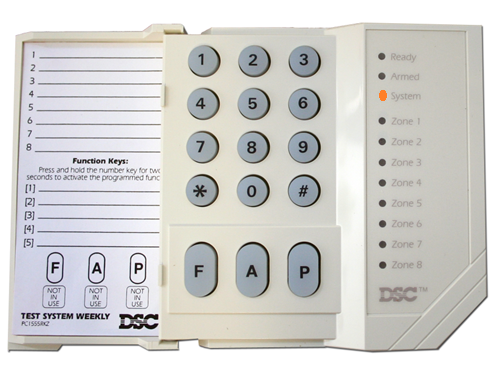
All modern alarm systems notify you on the of trouble conditions that exist on the panel. The panel notifies you, with the yellow/orange triangle on the keypad that a trouble condition exists. On the DSC Power Series (1808/1832/1864) you have a trouble condition command that helps installers to troubleshoot the alarm system. See the image below on one of the older keypads
How to view your trouble conditions
From the keypad type “[*][2]”. If you have an LCD keypad on the system, you can read the display and determine the type of error condition that exist on the system, by pressing your directional keys. If you have a LED keypad, the error conditions are listed by a LED light on the keypad that burns according to a zone number on the keypad. Each number represent a different error condition. Below is a list of error conditions:
Zone 1 – “Service required. Press 1 for more information. Below is a list of the sub trouble conditions after 1 is pressed and it corresponds to LED lights on the keypad
- 1. Low battery – Is one of the most common errors. The Low battery error condition here reflects that the system battery is faulty or low voltage.
- 2. Bell Circuit – Is also a very common error. Most likely reflects that you have a supervision error on your siren, or the siren is faulty.
- 3. General System trouble – You need to call an installer to clear this error.
- 4. General System tamper
- 5. Module Supervision
- 6. RF JAM detected
- 7. PC5204 low battery – Your Supervised power supply has a low battery condition or faulty battery.
- 8. PC5204 AC failure – Your supervised power supply unit Ac source is not present.
Main trouble conditions
If the system user did not press 1, here is the meaning of the LED lights.
- Zone 2 – AC trouble – If Ac power supply interrupted to the panel. Panel will run of the battery.
- Zone 3 – Telephone Line trouble – The system has detected that the telephone line is cut.
- Zone 4 – Failure to communicate – The system attempted to communicate with the monitoring station, but failed. This can also be caused by trouble 3. This trouble condition is also displayed on the keypad of the system using the abbreviation FTC.
- Zone 5 – Zone Fault (Press 5 for more information) – The system is experiencing difficulties with one or more sensors.
- Zone 6 – Zone Tamper (Press 6 for more information) – The system has detected a tamper condition with one or more sensors.
- Zone 7 – Wireless Device low battery (Press 7 for more information) – If one of the the wireless sensors on the system has a low battery condition.
- Zone 8 – Loss of time and date – If complete power was lost (AC and Battery), the time and date will need to be re-programmed. To see how to fix the date time you can follow this link: https://geldenhuys.tech/date-and-time/
Conclusion
I hope the list helps you in identifying the trouble and error conditions on your panel, and if you have an LCD keypad on the system, you can simply scroll through this list on the keypad. The system will show these options under the [*][2] command, and will only show them if there is a trouble condition. To exit you simply hit the pound sign, and that you can hit multiple times. [#]
In some cases it might be easier to contact a installer to help and assist clearing the issues like AC associated troubles or batteries that do not last will require the troubleshooting skills with more experience on the systems.