
Understanding Pixel Density in CCTV systems
Have you ever looked at CCTV footage, zoomed to see some detail and suddenly released that the image is pixelated, and you can’t see the details that you expected …
Pixel Density determines whether your CCTV footage is actually usable when something happens. Even high‑resolution cameras can fail if the pixel density is too low. By understanding px/m (pixel per meters), you can design systems that meet legal, insurance, and evidence‑grade requirement.
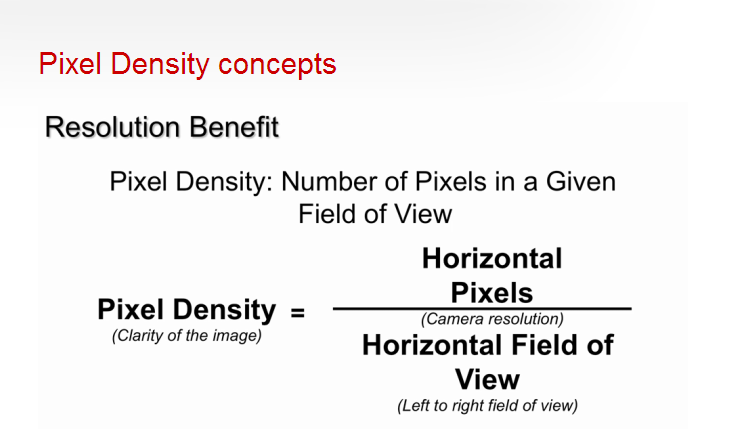
Pixel Density is one of the most important factors in determining how useful CCTV footage will be when you actually need it. For Homeowners, the general 1080p or 4K cameras normally tick all the boxes, but while resolution tells you how many pixels a camera can capture overall, pixel density tells you how many of those pixels are focused on each metre of the scene.
This directly affects how clearly you can see faces, licence plates, clothing details, or any identifying features in around the camera. A camera might be labelled as “4K”, but if it’s covering too wide an area, the pixel density may still be too low to provide meaningful evidence.
Why Pixel Density Matters
Different areas of a site require different pixel density levels depending on what you need to achieve. For example, entrances, reception desks, and access control points typically need high pixel density to reliably identify individuals. In contrast, open areas like car parks or warehouses may only need enough density for general monitoring or detection. By matching the pixel density to the purpose of each camera, you avoid overspending on unnecessary resolution while ensuring critical areas deliver the detail you expect.
Pixel density also helps you plan camera placement more intelligently. A single high‑resolution camera might seem like a good idea, but if it’s mounted too high or too far away, the effective pixel density drops sharply. Sometimes two lower‑resolution cameras placed strategically can outperform one expensive camera simply because they maintain the required density across the scene. Understanding this relationship allows you to design CCTV layouts that are both cost‑effective and evidence‑ready.
Pixel Density Formula
Recommended Pixel Density Levels
Historically, CCTV performance was defined using ROTAKIN and a percentage‑of‑screen‑height targets. While effective in the analogue era, these methods have been replaced by pixel‑density requirements, which translate camera resolution and field of view into clear, measurable outcomes for modern surveillance design.
DORI (Detection, Observation, Recognition, Identify) was built on old analogue standards like ROTAKIN. Modern CCTV design replaces these legacy measurements with pixel‑density requirements that accurately reflect today’s digital camera capabilities.
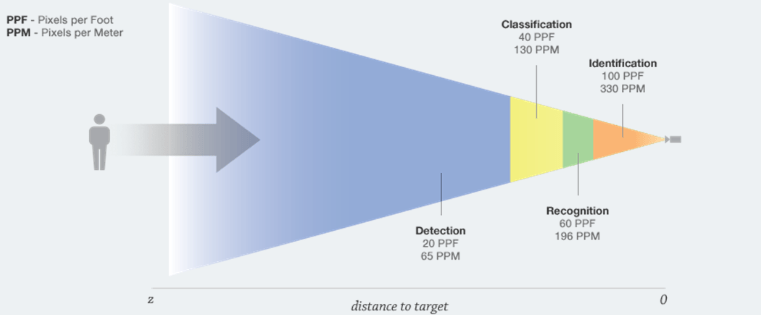
Depending on the purpose of the camera, each application has a minimum and maximum pixel‑density requirement (px/m). The achievable pixel density is determined by the distance to the target and the camera’s field of view.
In other words, the further the subject is from the camera, the lower the px/m value becomes — and once it drops below the required threshold for that purpose, the camera can no longer perform that function.
Lower pixel densities are suitable for general movement detection and basic intrusion monitoring, while higher densities are needed to distinguish humans from objects or animals.
As the required detail increases — such as reading licence plates, recognising faces, or identifying individuals through software analytics — the px/m values rise significantly. Extremely high pixel densities are required for fine‑detail tasks like reading currency serial numbers or keypad digits.
Below illustrates how pixel‑density requirements scale with the level of detail needed, ensuring that camera placement and field of view are matched to the intended purpose.
- General Movement: 16ppm
- Intrusion: 33ppm
- Higher Detail on Intrusion: 33ppm to 60ppm
- Difference between a human and an object/animal: 80ppm
- Visual License Plate Recognition: 130ppm
- Visual Facial Recognition: 195ppm
- Licence Plate Identification via Software: 260ppm (recommended)
- Facial Identification via Software: 330ppm (recommended)
- Currency Note Registration Number: 550ppm
- Digits on a Blackberry Bold (on the keypad): 940ppm
Finally, pixel density gives you a consistent way to compare different camera models and lenses. Instead of relying on marketing terms like “HD” or “Ultra HD”, you can calculate whether a camera will actually meet the identification, recognition, or detection requirements for your environment. This makes your CCTV system more predictable, more professional, and far more reliable when it matters most.
| Purpose | Required Pixel Density (px/m) | What It Allows |
|---|---|---|
| Detection | 25 px/m | See that someone is present |
| Classification (Observation) | 62 px/m | See actions and general behaviour |
| Recognition | 125 px/m | Confirm someone you already know |
| Identification | 250 px/m | Identify a stranger with confidence |
| High‑detail tasks | 350–400 px/m | Licence plates, fine detail, evidence‑grade |
Practical Pixel Density Examples (1080p, 4MP, 8MP)
Example 1: 1080p Camera (1920 × 1080)
What this means:
A standard 1080p camera has 1920 horizontal pixels. If this camera covers a 10‑metre wide scene:
Pixel Density = 1920/10 = 192 px/m
- 192 px/m is enough for recognition and borderline identification.
- Good for entrances, small rooms, and narrow corridors.
- If you widen the scene to 20 metres, density drops to 96 px/m → only observation level.
Example 2: 4MP Camera (2560 × 1440)
A 4MP camera typically has 2560 horizontal pixels.
If it covers the same 10‑metre wide area:
Pixel Density = 2560/10 = 256 px/m
What this means:
- 256 px/m meets the identification standard (250 px/m).
- Ideal for entrances, cash‑handling points, and access control.
- If you widen the scene to 20 metres, density becomes 128 px/m → recognition level.
Example 3: 8MP / 4K Camera (3840 × 2160)
A 4K camera has 3840 horizontal pixels.
Covering a 10‑metre wide area:
Pixel Density = 3840/10 = 384 px/m
What this means:
384 px/m is excellent for high‑detail tasks like licence plates or evidence‑grade footage.
You can widen the scene to 15 metres and still get:
3840/15 = 256 px/m → still identification level.
Conclusion:
Pixel density is one of the most reliable ways to predict whether a CCTV camera will deliver usable evidence. By matching px/m to the purpose of each camera, you can design systems that are cost‑effective, compliant, and reliable when it matters most. Whether you’re planning a new installation or upgrading an existing one, understanding pixel density ensures your CCTV system performs as expected.