
How to add users, codes or Pins on a DSC alarm System?
To add additional users or pin codes to arm and disarm the system, you can create additional pin codes on the system. The reason why most people prefer to have a pin code for each user, is so that they can identify who armed or disarmed the system, and they can check who bypassed certain zones if the code has rights to to bypass a zone. Some codes might be restricted and can be used by cleaning personnel. There is also the matter of assigning the newly created code to the right partition if you have a multi-partition system setup on your alarm system. If you create a new code by default that code will be assigned to partition 1, but on bigger systems codes need to be assigned to the right partitions, as well as things like bypass rights and duress rights ect needs to be assigned to the code.
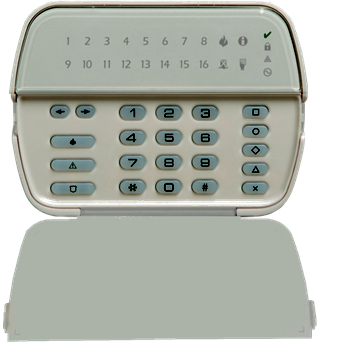
DSC Power series – Adding users or pin codes to the system.
The power series (18XX series) type the following:
Example (Note that numbers between brackets represents a key-press. Below is an example where we add 4321 as user 2 on the system. I use the master code 1234 to enter the programming location, and completed the programming … See the breakdown below.
[*][5][1][2][3][4][02][4][3][2][1][#][#]
- *5 – command to enter add programming user
- 1234 – Is the default master code to the system. Remember to adapt this code so that it applies to you. This code will be changed for security purposes to a personal code that belong to you.
- 02 – is the user number. This location can be 03/04/05… depending on the amount of users you are adding the system.
- 4321 – Is the new user code that has been added to the system. This is only an example. Please input your own 4 digit code into this space.
- # – is to exit the programming location. As you see we are pressing it more than once just to confirm that we are out of the programming location.
Keypad Lockout on wrong pins
A couple of tips when creating pin codes… Always make sure that the new pin code is not a duplicate of one already on the system. Codes like 1234 or 4567 or 4321 is not a secure pin (default master code 1234 needs to be changed). If there are a lot of users on the system do not put pins like 1234,1235,1236 on the system, and your birth year might be a great way to remember your pin for example 1975, but it’s not good practice.
If a user pin code is incorrectly used a couple of times on the system, the keypad will lock. Simply leave the keypad for a period and the lockout will expire, and you can use the keypad again.
Apps
Most modern systems will give the user an option to add additional user codes by an app on their phone, and can extend the functionality of older alarm systems, and make it much easier to quickly add codes for visitors or cleaners. It will allow you to change codes or pins on the fly, incase a code has been forgotten.
Apps to look at for on the DSC 18xx series of panels
- ‘The DSC Envisalink module can be used with either the Connect2Go Mobile app or the EyeZon Mobile App. Both apps are available on Google Play: EyezON Mobile and Connect2Go Mobile.’