
Terminology for Alarm Systems
When it comes to understanding of Intruder Detection Systems, familiarizing yourself with the relevant terminology is essential. The field of alarm systems has its own set of specialized terms and concepts that are crucial for effective communication and comprehension. Whether you are an alarm system technician, an installer, or a homeowner seeking to protect your property, having a solid grasp of the terminology used in this domain is key to making informed decisions and effectively discussing alarm system components and features.
In this introductory guide, we will explore some of the common terms and phrases used in the world of alarm systems, providing you with a foundation of knowledge to navigate this field with confidence. From sensors and zones to control panels and arming modes, let’s delve into the terminology used in the realm of alarm systems.
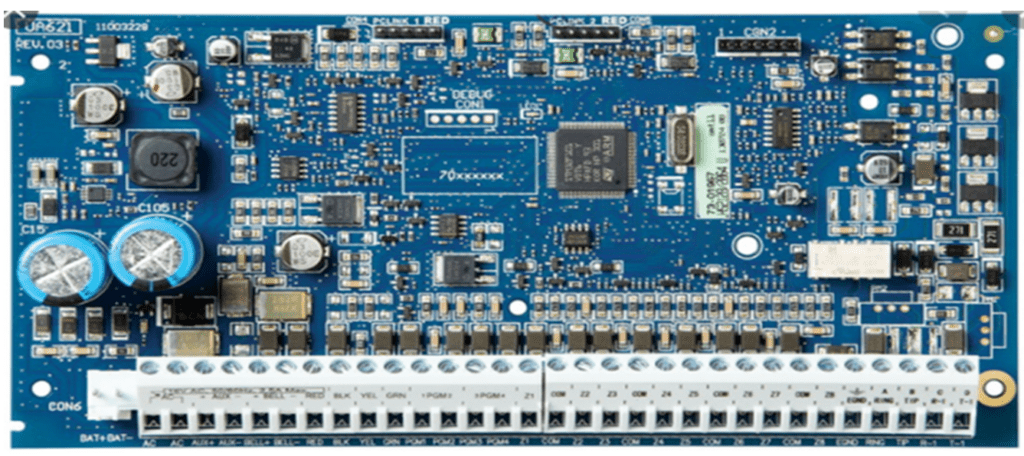
Zone
A zone is an input on the panel and allows detection devices to trigger the panel when required. Open Zones prevent the panel from Arming. It’s a physical connection on the Main PCB that is used to connect other sensor’s that provide or send signals to the Main Alarm Board. These connections are called zones or generally Inputs.
Sensors can be a lot of different devices that is used to detect the alarm condition, and these can range from PIRs (Passive Infrared devices) to Door contacts, Vibration devices etc….
Zone Type
A zone is an input to the panel and allows detection devices to trigger the panel when required. Different zone types with different ways of behaving are available, we refer to it as programming options for the zone. There is a long list of Zone Types that can be programmed for each zone. These zone types allow the zone or input on the beard to behave differently under certain conditions.
24 Hour zones will trigger the panel regardless of the armed state. Instant Zones is used on the perimeter of your building or Zones that need to trigger immediately without time delay.
Different Zone types
Different Zone types that you might encounter:
Interior Zones.
Interior with stay Zones.
Fire Zones.
Panic Zones.
24 Hour Zone types
**Some zone types work with
Entry and Exit Delays
Most panels are armed by means of keypads mounted inside the protected area. A limited time is allowed (Entry/Exit Delay) to enter the premises via a specifically planned route to disarm the alarm system without triggering an alarm. Should a burglar break in via another route the alarm will activate instantly or immediately. The alarm will activate if not disarmed within the pre-programmed time.
- This zone type should only be used on magnetic contacts fitted to doors. It should never be used for PIR’s and other motion detectors.
One PIR per zone, can use more than one magnetic contact per zone. (Recommend one zone per device) Also Regulation aspects. Entry/Exit zones may not be used for windows or non-Entry/Exit doors. PIR’s must never be used for Entry/Exit zones. Up to 5 Panic buttons per zone. (Remote/Fixed – Recommend one zone per device)
Interior Zones
Interior zones should always be used for motion detectors positioned along the entry exit route. Between the door and keypad.
Instant Zones
Perimeter zones, Zones that needs to trigger immediately. It creates an instant alarm whenever it is triggered and the system is armed. Normally used on windows and non-entry/exit zones.
Partitions
A physical area is divided into imaginary subsections and is allocated a number. Each partition is allocated to a number of Zones.
User codes can operate multiple partitions. Each partition can often have customizable characteristics. Two entry/exit delays per partition. Open and closing reports per partition.
Chime
The Chime Feature is used to sound a tone from the keypad whenever a zone programmed as a chime zone is activated.
If the door chime feature is enabled, the keypad will emit a short sound whenever chime zone is activated. Designated entry/exit doors are often defined as chime zones. When the feature is enabled, the keypads will sound when a entry/exit door is opened. To turn Door chime ON or OFF, use your function buttons.
Bypassing
This allows you to switch off certain zones before you arm the alarm.
These zones will not activate the alarm for the duration of that arming period. Bypassed zones will reset on disarming the alarm.
Bypassing any zones can have fatal results as the intruder will not be detected by the alarm when entering at that specific area where the zones are bypassed. When making use of this feature, make sure only one person has access to it that knows the risks associated with using the feature, especially in corporate or factory environments.
Group bypassing
allows for a number of zones to be bypassed simultaneously. It is strongly recommended that faulty zones are reported.
Arming
This means that the panel is switched on and will go into an alarm, if the zone is triggered.
Stay arming
See arming… means that portions of the panel is armed, but allows for movement in parts of the premises. This is often used to secure the perimeter of the premises at night or in the evening when a house is occupied.
Night arming
means that most of the panel is armed. It excludes bedrooms and related passages, where you move freely at night.
Forced Arming
Each Zone can be programmed individually to allow the system to be armed, even though the zone is not set. If the zone sets before the exit delay expires the zone will be armed with the remainder of the system, if the zone is still not set, it will be bypassed.
This feature is useful for PIR with keypads in their detection areas. Garage /Roller doors that are used for exit delays.
Duress
A duress code can be used to disarm the panel when the user is forced to do so by an intruder.
The panel will disarm normally but will communicate a duress signal to the control room. No indication will be given at the premises
Note: Communication plays a role
Panic
Police, Fire, Medical are panic buttons on keypads of alarm systems or on their remotes.
When pressed this is a high priority signal… In most cases. Vehicle is dispatched immediately. Controller must immediately phone – unless otherwise specified in special instructions. On arrival, Reaction Officer will scan the immediate surroundings for suspicious people or vehicles. Only then will the R/O approach the premises with caution.
Note: Some regions of the world use Police for Reaction
Alarm Activations
The siren sounds. The panel attempts to communicate to its monitoring station or APP service provider. The panel blind dials or listen for dial tone, before dialling the programmed number. If communication is interrupted the panel can retry three or more times. Some panels have this as a programmable value. Telephone has a delay, before successful communication of the signal. Ethernet/4G/5G is almost instantly.
Bell Cut of Time
When siren or bell cut-off time is programmed into the panel, the siren will sound for a single activation for the pre-programmed time (normally three or four minutes).If a number of activation’s occur, the siren will sound continuously until the siren cut-off That is the timeout of the last activation.
Swinger Shut Down
The system tries to communicate an event x number of times. After when the programmed number of times has been done, and all the attempts have been unsuccessful the panels stop trying to communication. This is done to stop runaway signals.
This section is programmable on most alarm systems, and you can set the attempt before it tries to stop by programming your own values.
Disarming
This is when the system is switched off.
Alarm memory
The ’Memory’ light will be on if any alarm occurred during the last armed period or – in the case of 24 hour zones – If’ an alarm occurred while the panel was disarmed.
Event Log
The event buffer records all activities of the alarm system in the panels memory until full. When full the last event is overwritten by the next event.
Event buffers can usually be read by an LCD keypad, or uploaded by software, and printed.