DSC PowerSeries Range of Panels
The DSC PowerSeries is a versatile and trusted security system that has stood the test of time, earning its place as a top choice for both residential and commercial properties. This robust system offers more than just basic protection; it’s a comprehensive security solution designed to safeguard against a wide range of threats, from break-ins to fires.
What sets the PowerSeries apart is its ability to be integrated into Home Assistant. The system leverages features like wireless connectivity and alarm sensors, ensuring that your property is monitored around the clock with precision and reliability. One of the PowerSeries’ greatest strengths is its adaptability. No two properties are alike. That’s why they’ve made the system highly customizable, allowing you to tailor your security setup to your exact specifications. Whether you need a simple home alarm or a complex multi-zone system for a large business, the PowerSeries can be configured to meet your needs.
Why Choose the DSC PowerSeries?
The DSC Power Series stands out in the crowded security market for several reasons. Its reputation for reliability and durability makes it a favorite among homeowners and businesses alike, even if it considered to be more than. The system’s scalability allows it to adapt to a wide range of environments, from small residences to entry level commercial buildings. This adaptability is further enhanced by its compatibility with a variety of sensors and devices, enabling seamless integration into Home Assisant and adding 3rd party equipment.
When you integrate the DSC PowerSeries with Home Assistant, you truly unlock the full potential of your security system, transforming it into your best friend in home automation. This powerful combination allows you to effortlessly monitor and control your security setup from anywhere, giving you real-time updates and notifications right at your fingertips. With the ability to create custom automations and scenarios, you can ensure that your home is not only secure but also seamlessly connected to your daily routines. Whether you’re arming the system before heading out or receiving alerts about any unusual activity, the DSC and Home Assistant partnership enhances your peace of mind and elevates your smart home experience.
Whether you’re installing a new system or upgrading an existing one, One of the great advantages of integrating your DSC PowerSeries with Home Assistant is that you don’t have to sacrifice professional monitoring for smart home functionality. You can still have your system professionally monitored while enjoying the benefits of Home Assistant integration. This setup allows you to have the best of both worlds: the peace of mind that comes with 24/7 professional monitoring and the convenience of smart home automation. With this combination, you can receive instant notifications on your smartphone, create custom automations based on your alarm system’s status, and even arm or disarm your system remotely, all while knowing that a professional monitoring service is standing by to respond to any emergencies
Panels
Key Features of Popular Models
- PC1616: Ideal for smaller homes, this panel supports up to 16 zones and offers basic security features, making it a budget-friendly option for simpler security needs.
- PC1832: A versatile choice for medium to large-sized properties, this one supports up to 32 zones and includes advanced features like partitioning, so you can separately control different areas within the same system.
- PC1864: Designed for larger setups, this panel supports up to 64 zones, making it perfect for complex security needs in big homes or small to medium size business setups.
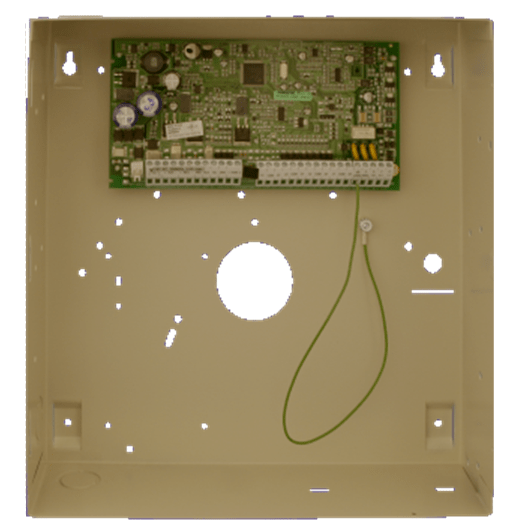
In South Africa, there’s also an additional panel, the 1808, which offers 16 zones, 8 partitions, 4 PGM outputs, and supports wireless devices. I’ve added images below of the keypads and the main panel PCB to help you identify them easily.
Additional Insights: Integration with Smart Home Systems
Integrating the DSC PowerSeries with smart home systems can be a bit tricky due to its proprietary nature. To truly open up the DSC PowerSeries for broader smart home integration, you’ll need an Envisalink module. This module, when used with Home Assistant, allows you to connect the DSC system with various smart devices like smart locks, cameras, and other home automation systems like OpenHAB or Home Assistant. This setup enables you to manage your security system remotely using mobile apps or web interfaces, providing you with real-time alerts and control whenever you need. Adding features and devices to the system that is supported by newer security systems and provides with traddional methods of communicating to control room environments without comprising on insurance.
- Video Verification (detectors with built in cameras) – 3rd part options available
- Zigbee
- Motion sensors
- Door Contacts
- Temperature and Humidity Sensors
- Zwave
- Motion Sensor
- Door Sensors
- Temperature Sensors
- Cameras
- IP cameras Into Home-assistant
- Analytics and triggers from cameras into Home Assistant
- Security Lights (Smart Bulbs) ect
Security and Compliance
The DSC PowerSeries is designed to meet stringent security standards and regulatory requirements, ensuring your property remains protected in full compliance with industry norms. This commitment to quality and safety doesn’t change when you integrate the system with Home Assistant. In fact, you can maintain professional monitoring services alongside your smart home setup, provided you use the panel’s onboard Dialer or DSC IP communicator is used for communication with the monitoring station.
This dual approach allows you to enjoy the best of both worlds: the advanced features and customization options of a smart home system, coupled with the peace of mind that comes from professional monitoring. The key is to ensure that the core security functions remain untouched and compliant.
However, it’s important to note that some professional installers might change the installer code during setup, potentially limiting your access to certain system features. This practice, while sometimes necessary for maintaining the integrity of the security setup, can restrict your ability to make changes or integrations on your own.
Customer Support and Community
DSC offers extensive customer support and a strong community of users and experts who share tips, insights, and solutions in groups. Whether you’re troubleshooting an issue or seeking advice on optimizing your system, there’s plenty of resources to help you out.
Pictures of Panels